Lab Description
In this blog post I will deal with a very beginner friendly lab created by 13CubedDFIR. The lab was created for the amazing forensic and DFIR training and challenge platform XINTRA. To access the challenge, the paid subscription of XINTRA is required, which is in my opinion absolutely worth the price!
During this lab you will learn how to use MemProcFS for memory analysis of two key systems. A basic workstation PC on which the attacker got initial access using a phishing mail, and the domain controller of the KG Distribution enterprise.
You will learn how to perform memory forensics involving:
- C2 Analysis & Identification
- DLL Injection Techniques
- Persistence Techniques
- Exfiltration & Staging
Notice, that 13CubedDFIR also does provide specialised training courses around the topics of DFIR, as well as providing a very informative YouTube channel. E.g., for more information on how to use MemProcFS, you may like to check out “13Cubed’s Training course”: https://training.13cubed.com/investigating-windows-memory.
Enough of the advertisement and let us dive into the adventure of volatile memory forensics.
Scoping Notes
Last week, Patricia Bethel started her new job at KG Distribution. Amid the rush of HR and other on-boarding tasks, Patricia received an email from IT Support urging her to complete an important task. Trusting the source, Patricia carefully and diligently followed the instructions before continuing with her workday.
Several hours later, the Security Operations Center (SOC) helpdesk received an alert regarding unusual behaviour on one of the domain controllers. As part of their incident response protocol, the SOC remotely captured volatile evidence from this system, as well as from any other systems that had recently interacted with it in an atypical manner. Since it is now after normal business hours, the SOC has not yet been able to reach Patricia to question her about any activity on her system or to analyse the system itself. KG Distribution is also reluctant to take the domain controller offline and risk an outage, even after hours, until they are certain that the activity is indeed malicious.
As the Senior Security Engineer on call for after-hours alerts, it is now your responsibility to analyse the available evidence. Your task is to determine whether a security incident has occurred, and if so, identify the key details of the incident to decide if further action is necessary.
Volatile Memory Analysis of the Workstation
We start our investigation by opening the provided memory image in MemProcFS.
.\MemProcFS.exe -device "C:\Labs\Evidence\KGDistribution\Workstation\WORKSTATION.vmem" -forensic 1 -license-accept-elastic-license-2-0
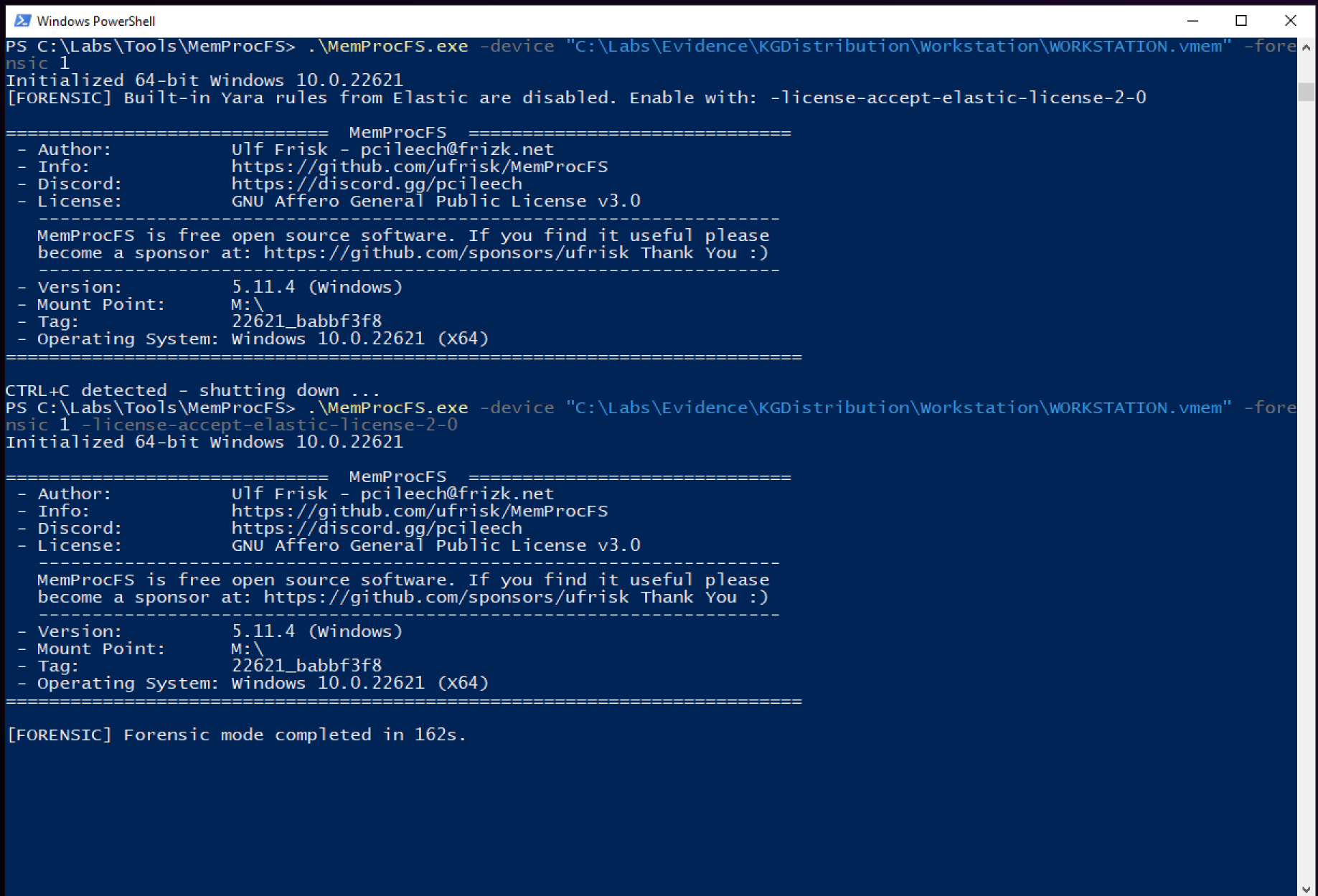
Beside providing the plain memory image, we use the forensic option to run several forensic plugins like malfind, as well as accepting the elasitc-license-2.0. The later is required to enable the built-in yara rules in MemProcFS.
Right after mounting the volatile image as file system, we can browse to M:\sys to get an overview of general machine parameters.
- Hostname:
BLD2-RM202-14 - Logged-on Users:
- User Principal Name:
patricia.bethel - SID
S-1-5-21-2781234159-3908489525-3167879470-1128
- User Principal Name:
- Operating System:
Windows 10.0 (build 22621) - Network Interface:
- IP Address:
192.168.8.12 - Gateway:
192.168.8.1 - DNS Servers:
1.1.1.1,8.8.8.8
- IP Address:
- Time Boot:
2024-08-11 16:24:02 UTC
Additional parameters, may be extracted directly from the registry located at M:\registry. So, e.g., we can figure out the domain name, by browsing M:\registry\HKLM\SYSTEM\ControlSet001\Services\Tcpip\Parameters\domain corresponding to the actual registry key HKLM\SYSTEM\ControlSet\Services\Tcpip\Parameters\domain.
According to the scoping notes the user patricia.bethel was opening a malicious phishing mail on the machine. Checking the directories contained in M:\name we can see that their is Thunderbird listed among the processes present when the memory dump was created. Actually, there were four processes, with IDs 8056, 8856, 103040 and 12496, present. We checked all of the directories and the handles opened, however we did not find any evidence of the mentioned mail. So we were on a dead-end here. According to hint from the platform, we should check for file activity. Considering the fact, that we were asked about a timestamp, our best option may becomes to check the Timeline(s) generated by MemProcFS. We browse to M:\forensic\csv and open the timeline_all.csv in Timeline Explorer. After some scrolling, we found reference to a file called [Action Required] IT System Upgrade.eml. The screenshot below will depict our findings.

We can observe that at 2024-08-18 16:31:58, there was a link file created in Windows\Recent directory of patricia.bethel. Hence, 2024-08-18 16:31:58 is the date of opening the phishing mail!
Once, we have the timestamp of initial compromise, it is a good idea to follow the timeline. So let us remove all filter and start scrolling down the timeline. Just a few minutes later, at 2024-08-18 16:32:50, we notice a NFTS file created event. The user patricia.bethel downloaded a file called dwagent.exe. Researching on dwagent.exe we can get to know that the binary downloaded is part of DWS Remote Control software. Putting the purpose of this software in context with the timestamp close to the phishing mail, this tool was likely used by the attacker to remote control the machine. Later at 2024-08-18 16:33:13 we found evidence of creation of a Prefetch file, hence we now know for sure that the dwagent.exe was indeed executed.
Now, usually,. from M:\forensic\csv\prefetch.csv we can extract the timestamp of first execution. However, for some reason there is no Prefetch entry for dwagent.exe, which I could not explain!
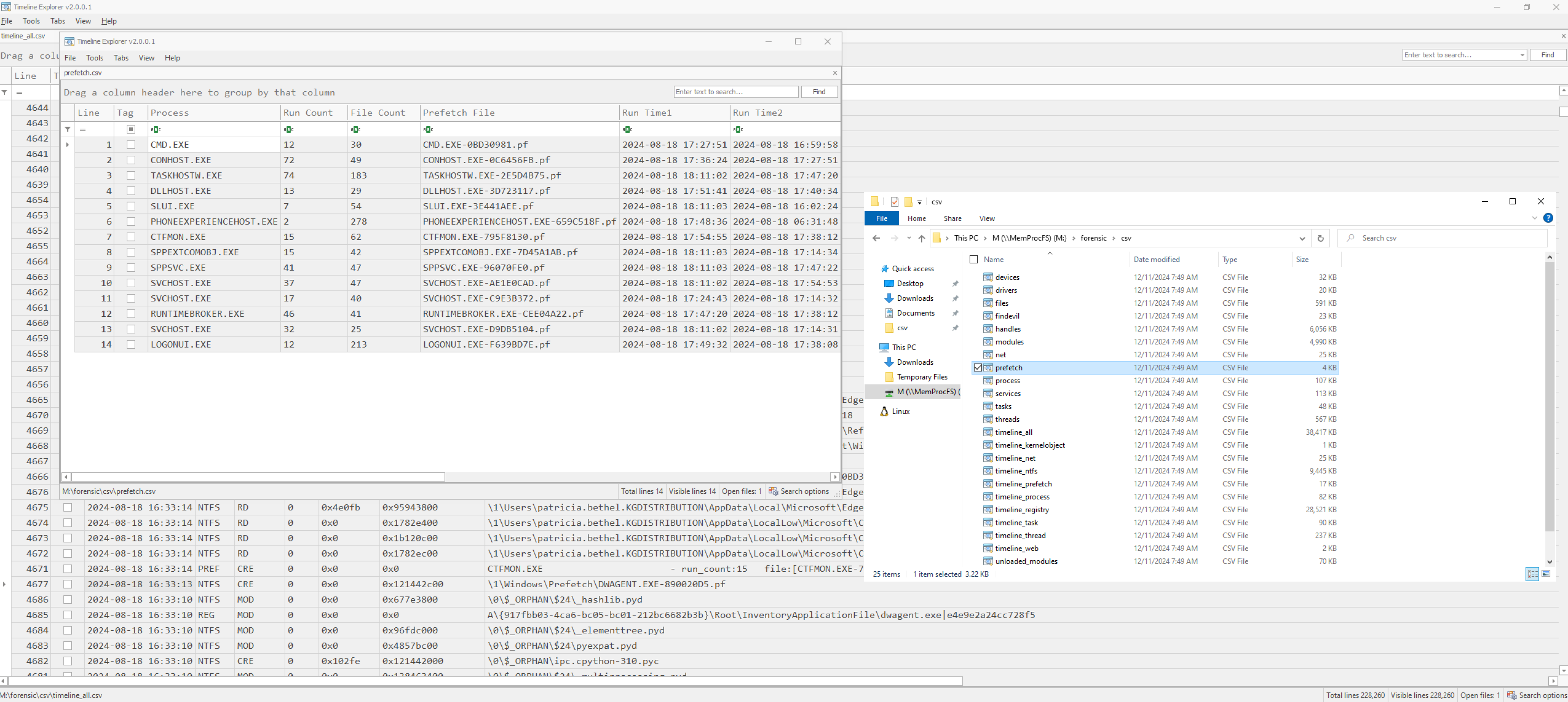
Anyway, we can assume that the dwagent.exe is still running due to the purpose of remote administration by the adversary. Hence, we can assume that we will still find Creation Time timestamps inside the process memory itself! We Open M:\sys\proc\proc.txt and search the process tree for dwagent.exe. Indeed we have a hit and get to know the execution-timestamp. It is 2024-08-18 16:33:30 UTC.

Continue scrolling through the timeline_all.csv we observe some evidence of basic enumeration later around 2024-08-18 16:34:13, where the attacker executed whoami.exe. Followed by execution of query.exe and quser.exe at 2024-08-18 16:34:51. At 2024-08-18 16:35:48 the attacker continued enumeration using net.exe.
Next, at 2024-08-18 16:53:46 the attacker used curl, likely to download a file. Surrounding events may bring us to the conclusion that the attacker downloaded OfficeUPgrade.exe. It was shortly created afterwards and there seems to by a typo in place! A minute later at 2024-08-18 16:54:46 we can spot evidence of execution of OfficeUPgrade.exe by the created prefetch file. Also, we observe that the registry was modified directly with the execution of the binary. According to the log, the key HKLM\SOFTWARE\Microsoft\Windows\CurrentVersion\Run was touched. So likely, we have found a persistence mechanism.
To get a better picture of the entire workflow of the adversary, we may like to use the timeline_all.csv, but this time filtering on *.pf entities only. Thus, we obtain a nice list including execution of evidence and corresponding timestamps!
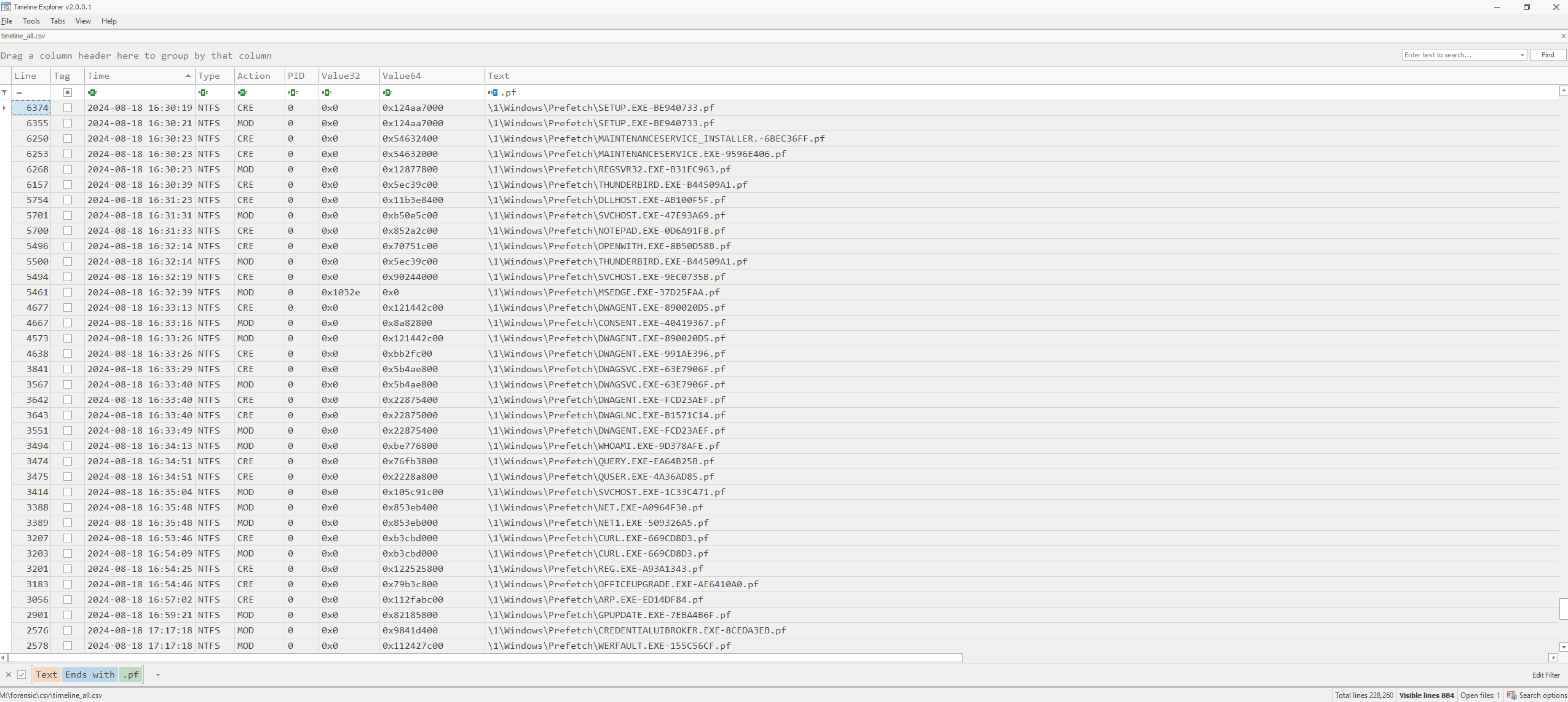
Removing again the filters and focusing on the entire activity, we spot beginning with 2024-08-18 17:27:43 some established connections to 64.23.144.215:8888 likely being related with adversarial activity due to the time correlation.
Let us go one step back, and focusing again on OfficeUPgrade.exe. If our assumption is right, and the mentioned binary is indeed malware, likely the findevil plugin will have more information for us. So let us open M:\forensic\csv\findevil. Indeed, we have several entries related to OfficeUPgrade.exe.
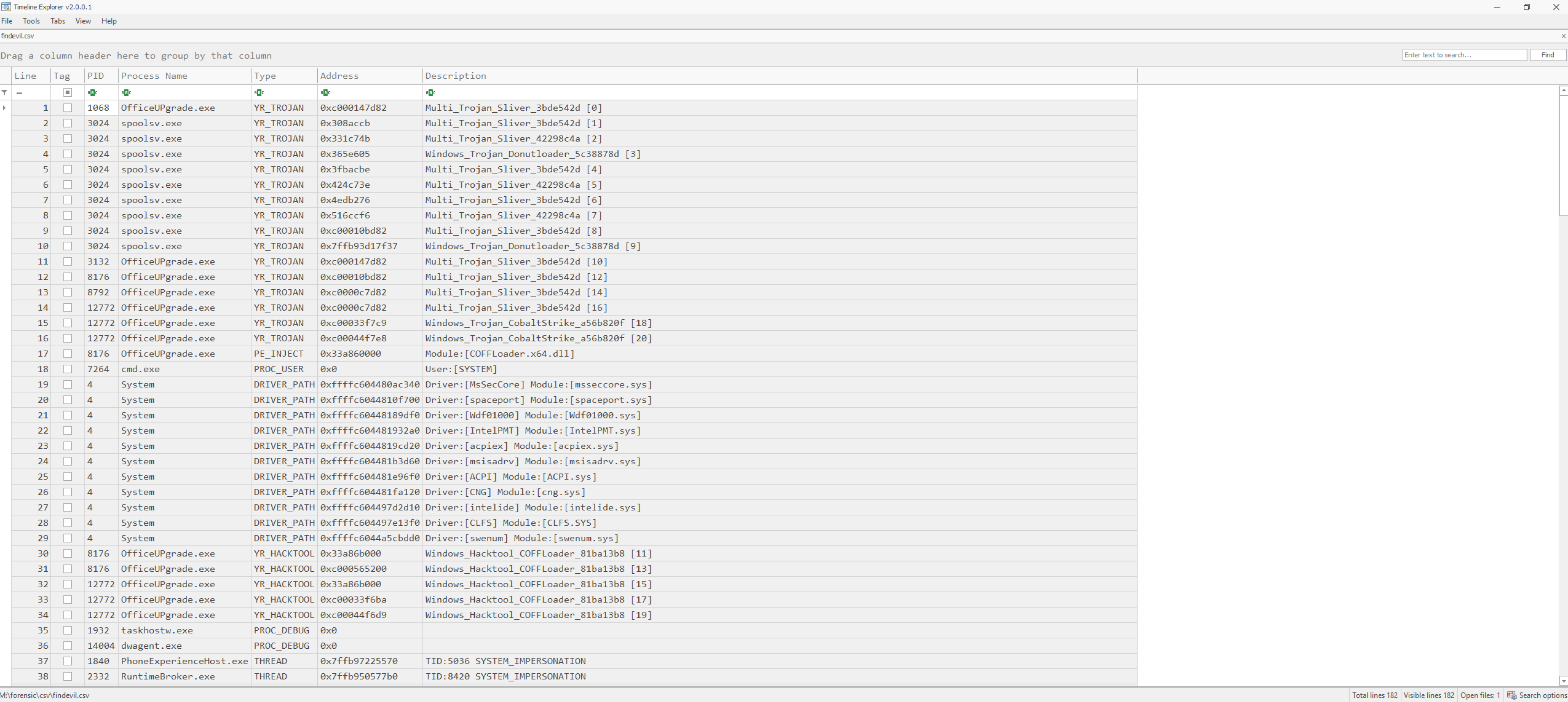
It looks like we have to deal with Cobalt Strike here. Also, we can identify a PE_INJECT type event in the COFFLoader.x64.dll module.
Finally, let us look around for any other file system activity may be related to the intrusion. Once again in timeline_all.csv we filter on Type NTFS and scroll through the filtered elements. At 2024-08-18 17:36:01 we spot the creation of a file named \Users\temp.ps1. For this script we do not find any entries in the findevil data. However, we are in the lucky situation to find the temp.ps1 file on disk extracted from the memory by MemProcFS. We open M:\forensic\ntfs\ntfs_files.txt and search for temp.ps1. We got a positive hit. The actual temp.ps1 will be located at M:\forensic\ntfs\1\Users. The scripts contents is printed below:
[Reflection.Assembly]::Load([IO.File]::ReadAllBytes("$pwd\CMSTP-UAC-Bypass.dll"))
[CMSTPBypass]::Execute("C:\OfficeUPgrade.exe")
Examining the script, we notice reflective loading of the CMSTP-UAC-Bypass.dll into the OfficeUPgrade.exe. While MemProcFS was not able to reconstruct this DLL file, the actual OfficeUPgrade.exe was reconstructed and is located in the \forensic\ntds\1 directory. The executables SHA-1 hash is DA39A3EE5E6B4B0D3255BFEF95601890AFD80709. Interestingly it was not detected as malicious by https://virustotal.com . Thus, we can expect that the threat actor was targeting us with a malware specially designed/modified for us. :-)
We now finally, may like to hand over the file to our reverse engineering and malware analysts department. Anyway, let us wrap up with the examination of the workstation and continue to check out the volatile memory of the domain controller provided as well.
Analysing the Domain Controllers volatile memory
Before investigating the domain controller, let us shortly discuss the possible pivot points we may like to use to start our examination. From the analysis of the workstation, we already have some ideas about the threat actors tradecraft.
OfficeUPgrade.exeor similar application names with minor misspelling in place.- The expected date of intrusion will be the
2024-08-18; likely after5:00 PM. - The attacker used
dwagent.exefor remote access, may also in place on the domain controller. - The IP address
64.23.144.215may serves as a good indicator of compromise as well.
We we check all of these indicators, we will likely not find any exact match but observe some similarities. There is indeed a connection to the IP address 64.23.144.215 in the logs, and we will find the keyword officeupgrade on the system as well. Anyway, finding these events may be daunting and time consuming. So let us take a different road. Assume for a moment we did not have found any similar. How would you start the investigation? Likely you would take a look at the list of running processes to check if there is any suspicious.
If we carefully read over the list of running processes, we will find a process running named rGARTERny.exe on PID 4544. The name looks very uncommon and suspicious. Checking the timeline, we see that the process was created at 2024-08-18 17:47:05 and started from the \Windows\Temp directory. Creation time and file location both fit into our adversaries behaviour! According to the process tree from M:\sys\proc, the parent process is services.exe. This indicates that the malware has installed a service in order to achieve persistence. So, we have our initial pivot point to start our analysis of the domain controller.
Let us investigate the services.csv, searching for rGARTERny first.
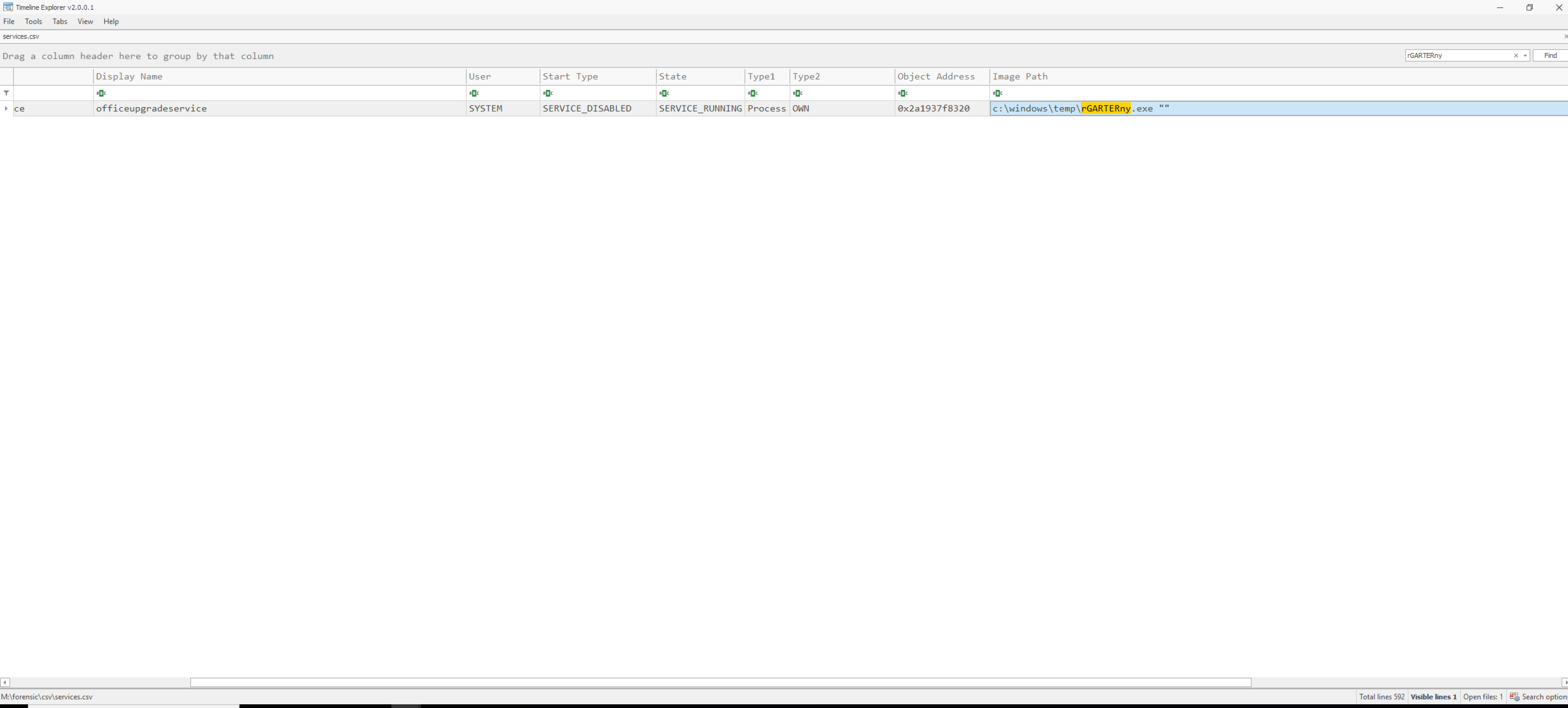
We immediately spot the installed service called officeupgradeservice, fitting well into the picture of attackers trade-craft. Now, we can certain that this binary is malicious!
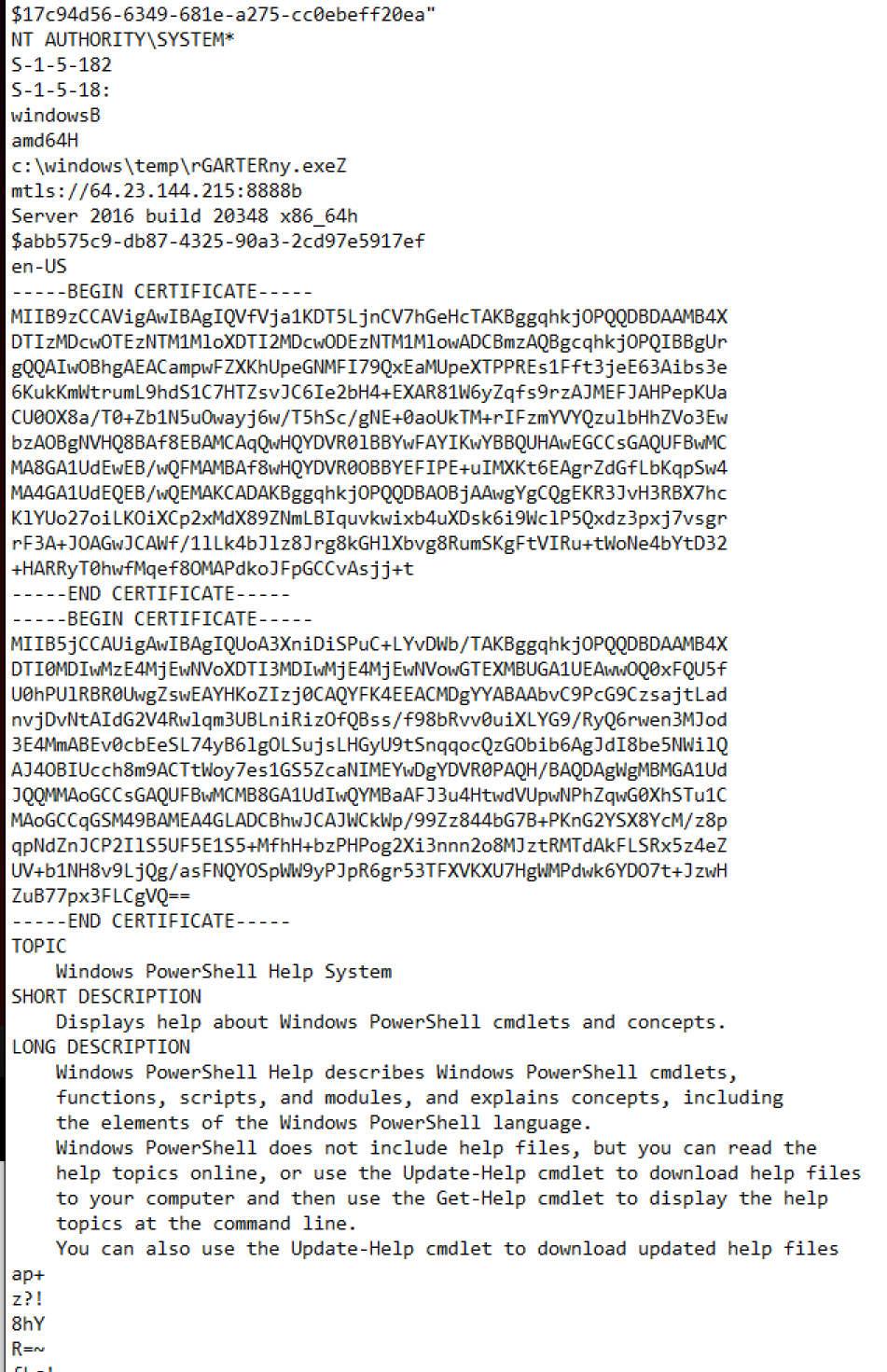
Notice, that the malicious binary is still present on disk. We can browse M:\forensic\files\ROOT\Windows\Temp to obtain a sample of rGARTERny.exe reconstructed from memory. Now, in theory we can hand it over to the reverse engineering and malware analysis department, however having a memory dump there are some other things we may like to do before. Inside the directory M:\pid\4544\minidump MemProcFS provides us a complete dump of the process executions memory. Since the memory snapshot was taken in runtime, all the contained code and strings are likely de-obfuscated! Thus, a perfect situation to mount static analysis on the dump. We let run strings against the dumped process memory.
Inside the memory dump there are several interesting artefacts. To just highlight some of them, you will find a screenshot of a certificate included in process memory below.
Even more interesting there is even a private key, we were able to dump from the memory.
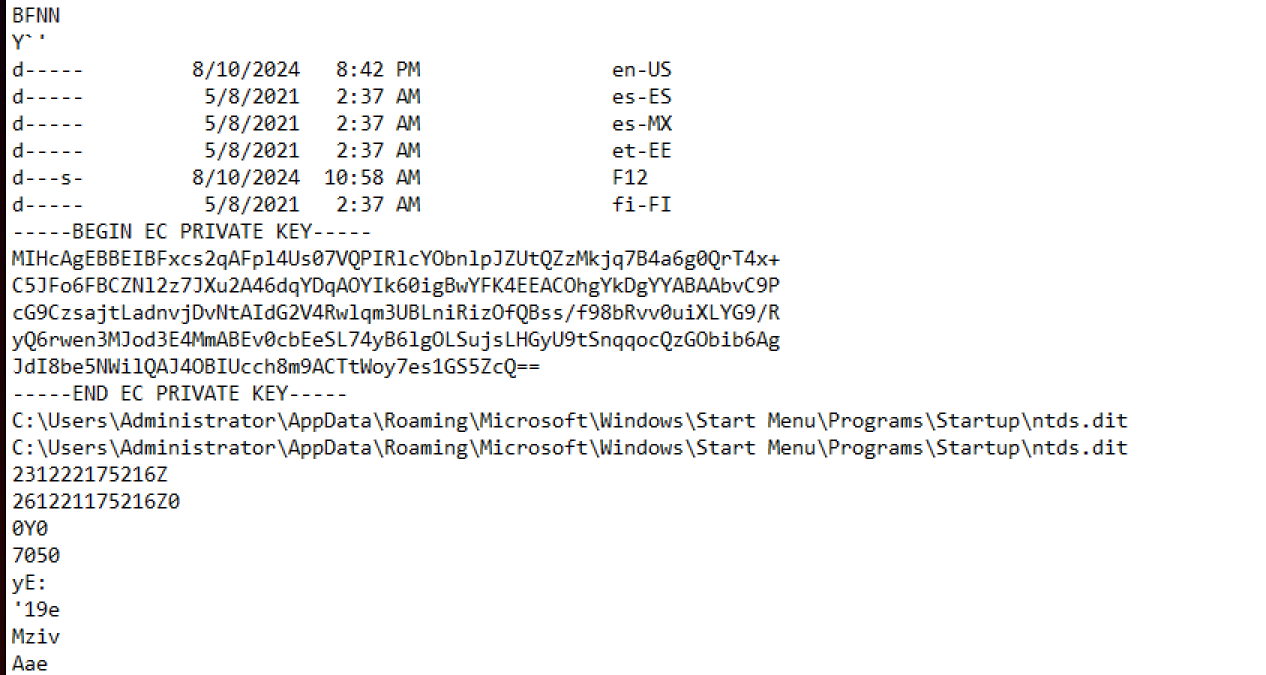
This private key is probably used to secure the communication channel with the attacker. Finally, we find a reverence to a persistence tool-kit named SharPersist.

So we can see, just from a simple string command executed on a memory snapshot we can obtain so much information, even without the least knowledge of complex reverse engineering! Anyway, leaving the path of technical deep dive, let us focus again on the process tree and examine parental relations of rGARTERny.exe to better understand how the malware was executed and what it did on the machine.
The child process of rGRATERny.exe is powershell.exe with PID 2404. The actual command-line executed is C:\Windows\System32\WindowsPowerShell\v1.0\powershell.exe -NoExit -Command [Console]::OutputEncoding=[Text.UTF8Encoding]::UTF8. Let us inspect this powershell process in more detail. We start by opening the handles.txt to see with which files / registry keys the process interacted. We immediately see ` \HarddiskVolume3\Users\Administrator\AppData\Roaming\Microsoft\Windows\Start Menu\Programs\Startup directory contained among them, a typical directory touched when dealing with persistence. Browsing the M:\forensic\files\ROOT\Users\Administrator\AppData\Roaming\Microsoft\Windows\Start Menu\Programs\Startup directory, we will find a OfficeUPgrade.exe. The files SHA-1 hash is FE4349DF84249FC96E75B84A028EF25C2876669B`. The hash does not match with the malware samples found on the workstation! Also https://virustotal.com does not yield any match.
Next, let us see what the findevil plugin is reporting about the found samples. The built-in yara scans indicate Multi_Trojan_Sliver_*. Sliver is a common command and control framework often used by penetration testers.
When dealing with command and control frameworks it is always good to assume some data exfiltration activity present on the machine as well. So let us hunt for any of them. Usually, when the adversary compromised the domain controller, the first thing done is to dump credentials required to during the high-privilege lateral movement phase. To this end, three files are of special interest, the SAM, the SYSTEM and the NTDS.dit files. So let us open the timeline_ntfs.csv from the forensic\csv folder generated by MemProcFS. We sort the columns by time and scroll down to the time of expected intrusion. Next, we look for any suspicious file access to these files.
Indeed, at 2024-08-18 18:04:56, we observe a uncommon access to the ntds.dit and SYSTEM hive, both required by the attacker in order to obtain all the domain users password hashes. The relevant events are highlighted in the screenshot below.
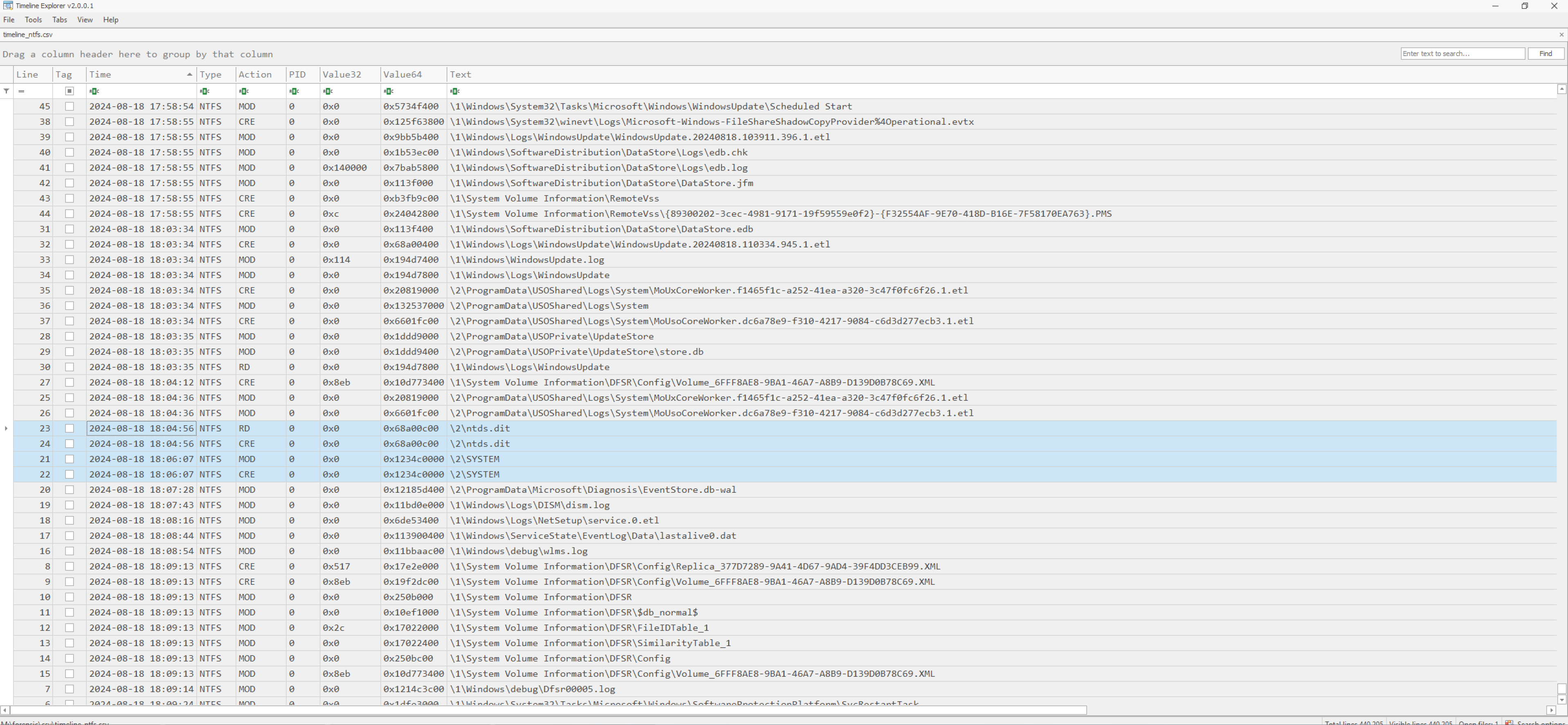
So from this point onward, we have to assume a complete breach of the domain. The threat actor certainly obtained domain users credentials may now be mounted in the context of pass-the-hash attacks or even using usual authentication assuming the adversary was able to crack some of the passwords at least.
Wrapping up with KG Distribution
Patricia Bethel a new employee at KG Distribution opened a phishing mail with subject [Action Required] IT System Upgrade on 2024-08-18 16:31:58 yielding a compromise of her local workstation. The threat actor was able to implant remote control capabilities using DWS Remote Control software. Once established the initial foothold, the attacker did basic enumeration and persisted on the machine using the registry Autorun keys. The implanted malware (OfficeUPgrade.exe) is of Cobalt Strike type.
Once, the threat actor fully compromised the client of Patricia Bethel lateral movement to the domain controller occurred. A new service named officeupgradeservice was created starting rGARTERny.exe from the Windows temporary directory. From the rGARTERny.exe process memory we were able to extract certificate and private key likely utilized by the attacker to secure communication channels. The used command and control framework was Sliver. The implanted tool-chain was used to exfiltrate the NTDS.dit and SYSTEM hive from the domain controller. So the threat actor achieved domain dominance and certainly obtained all password hashes / credentials from the KGDISTRIBUTION domain.