Windows Core Processes
In Digitial Forensics and Incident Response (DFIR), the most difficult task is in distinguishing the good from the bad. This task becomes even more difficult since adversaries try to blend in the commonly found process names on Windows operating systems to hide in the plain sight. In this short blog post, we will discuss some of the core Windows processes found on any system. We will shortly discuss the expected behaviour and indications of these system processes to may help in identifying suspicious ones.
Boot Secuence and Process overview
The first process launched by Microsoft windows is System.exe. According to the offical documentation System.exe is responsible for the following:
The System process (process ID 4) is the home for a special kind of thread that runs only in kernel mode a kernel-mode system thread. System threads have all the attributes and contexts of regular user-mode threads (such as a hardware context, priority, and so on) but are different in that they run only in kernel-mode executing code loaded in system space, whether that is in Ntoskrnl.exe or in any other loaded device driver. In addition, system threads don’t have a user process address space and hence must allocate any dynamic storage from operating system memory heaps, such as a paged or nonpaged pool.
Afterwards, the System.exe will spawn the csrss.exe, the wininit.exe, and the winlogon.exe via the Session Manager Subsystem according to the following depiction:
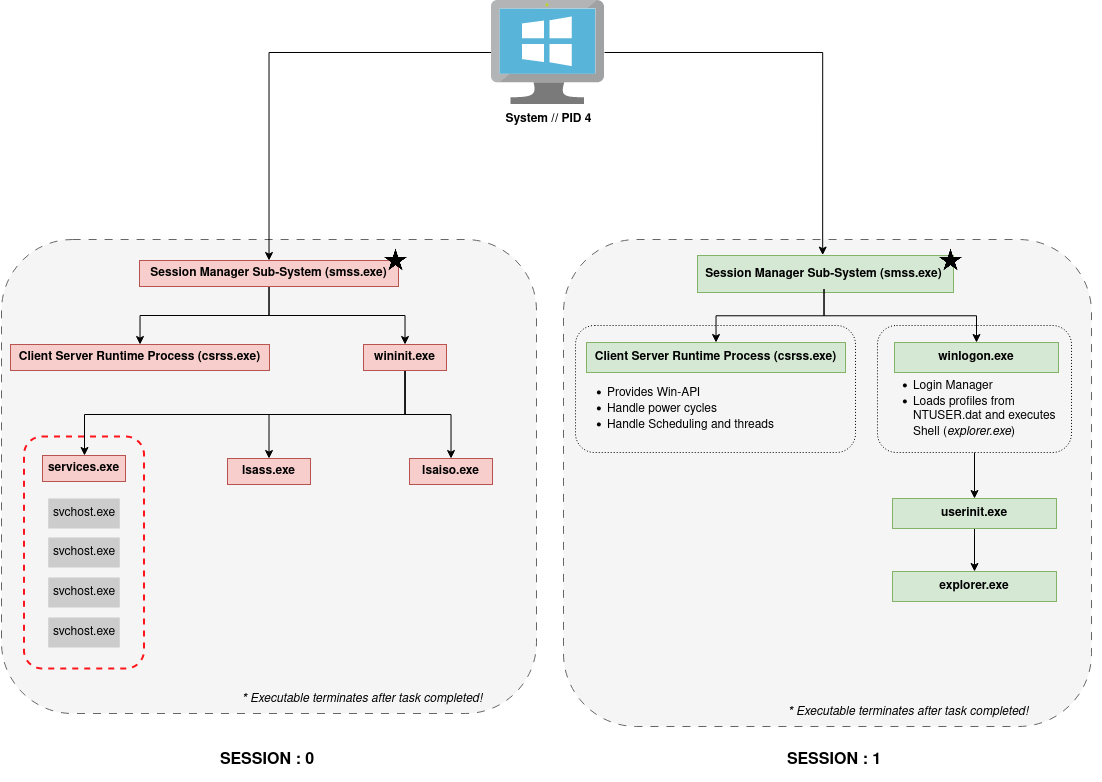
The depicted processes are shortly descriped in the table below.
| Process | Description |
|---|---|
system.exe |
- always PID 4 - first process created in boot sequence - run in privileged kernel mode only |
smss.exe |
- system.exe is always the parent! - two instances spawn; SESSION 0 and SESSION 1 - process terminates after execution! |
csrss.exe |
- spawned by smss.exe - does not have parent - two instances spawn; SESSION 0 and SESSION 1 - provides Win-API - Handles power cycles and Scheduling/Threads |
wininit.exe |
- spawned by smss.exe - does not have parent - only runs in privileged SESSION 0 |
services.exe |
- spawned by wininit.exe - handles services - only runs in privileged SESSION 0 |
lsass.exe |
- spawned by wininit.exe - Local Security and Account Sub-System - only runs in privileged SESSION 0 |
lsaiso.exe |
- spawned by wininit.exe - Part of Local Security and Account Sub-System - only runs in privileged SESSION 0 - provides sandbox features for lsass.exe |
svchost.exe |
- spawned by services.exe - runs tasks from *.dll files - can have various owners depending on the concrete service - always runs with flag -k |
winlogon.exe |
- spawned by smss.exe - does not have parent - only runs in user SESSION 1 - login management - loads profile from NTUSER.DAT and executes Shell Environment, e.g., explorer.exe |
userinit.exe |
- spawned by winlogon.exe - handles initalization of user profile - only runs in user SESSION 1 |
explorer.exe |
- spawned by userinit.exe - user shell - only runs in user SESSION 1 |
All processes created by the user later on will have explorer.exe as parent process.